Gestión WIN Full program · Free · €0

Invoicing, inventory and accounting. Free.

Gestión WIN is AI Soft Ventures' multi-company business management and accounting software: it issues invoices, tracks stock and keeps the books, and complies with Spain's Verifactu e-invoicing regulation (RD 1007/2023) from day one. Your data lives on your own computer, so you never pay a fee just to keep accessing it and your customers' information never leaves your business. Multi-currency, multi-warehouse and completely free: you only pay if you want annual technical support (€240) or an optional plugin. It installs from the Microsoft Store in a minute and, on a single computer, needs no separate database.

Get it from Microsoft
Your data on your computer · No fees to access it Your customers' data 100% confidential Full program · €0 · Verifactu-ready
The problem

Regulatory change won't wait. Your software shouldn't either.

Verifactu (RD 1007/2023) requires Spanish businesses to overhaul their invoicing systems. Traditional business software relies on years of customisations, cloud dependencies and recurring licences charged simply for using it.

Gestión WIN was born compliant with the new regulation, it is free and it only charges for technical support or optional plugins. It was designed from scratch with the regulation in mind, with cryptographic integrity of records and with real-world business operations: multi-company, multi-currency, multi-warehouse.

Modules

One system, all its modules connected.

Gestión WIN runs all its modules on a single database per company, with no intermediate syncing.

Invoicing

Invoices, sales and purchase delivery notes, recurring contracts, line-level or footer discounts and charges, corrective and replacement invoices, and factoring assignment. Series, counters and numbering continuity configurable from day one.

Inventory and stock

Multi-warehouse with stock adjustments, transfers between warehouses, batches and serial numbers, multiple price lists by customer or product family, and stock movements generated automatically from delivery notes.

Accounting

Journal entries, postings, accounts and sub-accounts, output and input VAT, received-invoice ledgers, fixed assets and depreciation. Configurable entry templates and direct accounting link from invoicing.

Verifactu

Automatic submission of records to the AEAT (Spanish Tax Agency), dual hash chain (RegistroAlta and Evento), generation of the official QR code and persistence of the submission status.

Multi-company and multi-currency

An independent database per company and currency management with a historical exchange rate per invoice, for accurate bookkeeping.

Payments and collections

Bank reconciliation, payment methods, due dates, imported bank statements and links to collections and payments. Partial and amount-based reconciliation.

Security and auditing

Users, roles and per-module permissions, logging of access and user changes, environment hardening, database integrity and automatic checks on every start-up.

Master data and catalogues

Products, product families, third parties (customers and suppliers), price lists, payment methods, warehouses, series, counters and issuing banks. The whole shared operational catalogue, in one place.

Automatic and recurring invoices

Set up recurring billing contracts with their schedule (monthly, quarterly, yearly…), lines, due dates and payment method. Gestión WIN generates and sends the invoices automatically and registers each one in Verifactu with no manual intervention.

Your data, on your computer

On a single computer, data is stored in SQLite with nothing else to install. On several office computers, in PostgreSQL (free) or SQL Server, with the Multi-user plugin. Backups in a single zip file with each company's supporting documents, ready to keep on an external drive or USB stick.

Full details, FAQs and sign-up are available (in Spanish) at gestionwin.com →

The sales cycle, end to end

From quote to journal entry, without duplicating data.

Gestión WIN models the entire sales and accounting cycle as a single flow, where each document feeds the next without re-entering information or losing traceability.

Quote

The quote is prepared for the customer and, once accepted, becomes an order without re-entering any data.

Order / Delivery note

Sales delivery notes are issued, with stock movements generated automatically.

Invoice

Delivery notes are grouped into an invoice, with discounts, surcharges, multi-currency and VAT rules.

Verifactu

The invoice generates its signed registration record, chained to the previous one, and it is sent to the AEAT.

Collection

Due dates are reconciled against bank statements, partially or in full, according to the configured payment method.

Journal entry

The accounting link posts the invoice to the books using entry templates configurable by series.

Closing

VAT ledgers, balance sheets and income statements are ready with no extra manual steps.

Audit

In accounting, every journal entry keeps its digital fingerprint and its creation or modification event, with a timestamp and user identity.

Regulatory compliance

Designed to comply from day one.

  • Verifactu (RD 1007/2023): every invoice is registered and sent to the Spanish Tax Agency automatically, complying with the regulation from day one.
  • Invoices that cannot be altered: once issued, each invoice is sealed and protected against any later modification.
  • Guaranteed traceability: invoices are chained to one another, so any tampering attempt can be detected.
  • Tax ID (NIF) validation with the AEAT: checks your customers' tax details to avoid errors on invoices.
  • GDPR: only the necessary data is stored, with a change log and respect for your customers' rights.
MCP · Claude, the AI assistant

Ask Claude about your company's data.

With the Claude Desktop app installed on your computer and connected to Gestión WIN, you can ask in plain language instead of searching through screens: “Which invoices are still unpaid?”, “How much have I sold this quarter?”, “How much stock of this product do I have left?”.

MCP (Model Context Protocol) is an open standard that lets an AI assistant such as Claude connect to other programs in a controlled way. Gestión WIN includes its own MCP connector: Claude does not access your database on its own, it asks Gestión WIN for what it needs, and Gestión WIN decides what it can see and what it can do. The connector comes with the program and is installed just once on each computer.

Sales

Sales by month, customer or product; issued invoices, quotes, orders and delivery notes.

Collections and payments

What you are owed and what you owe, due date by due date, and the cash-flow forecast by week or month.

Stock

Stock levels by warehouse and the movements of each product.

Accounting

Sub-account statements, journal entries, trial balance, balance sheet, profit and loss, VAT ledgers and fixed assets.

CRM

Leads, opportunities, tickets, tasks and the complete record of each customer.

Purchasing

Received invoices, purchase orders and supplier delivery notes.

You decide

Read-only, or create too.

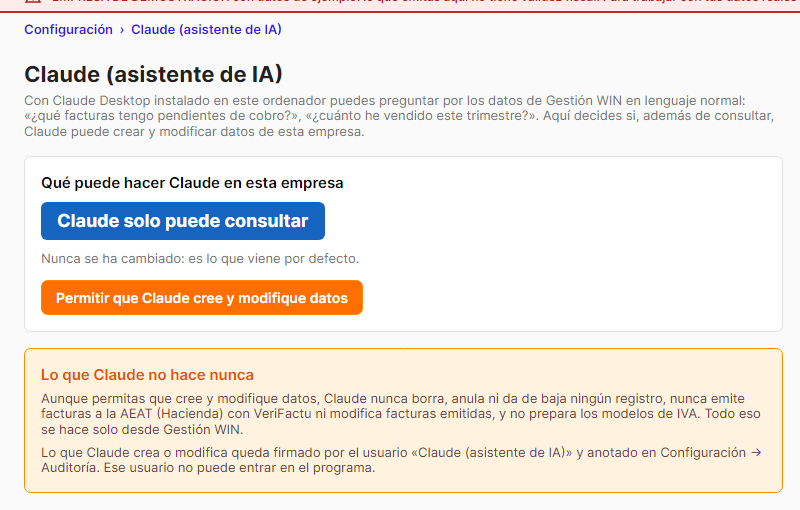
By default Claude can only read. Under Configuración → Claude (asistente de IA) (Settings → Claude) you can see its current setting, who changed it and how many changes Claude has made. If you wish, you can allow it to also create and modify data for that company:

  • Customers, suppliers and products
  • CRM contacts, opportunities, tickets and tasks
  • Quotes, orders and draft invoices
  • Received invoices, collections, payments and manual journal entries

The same button switches it back to read-only.

Gestión WIN's Configuración, Claude (asistente de IA) screen (Settings → Claude): Claude can only read, with a button to allow it to create and modify data
Configuración → Claude (asistente de IA) (Settings → Claude).
Fixed limits

What Claude never does.

  • It never deletes, cancels or deactivates any record.
  • It does not issue Verifactu invoices or modify issued invoices, and it sends nothing to the AEAT.
  • It does not prepare VAT returns: all of that is done only from within Gestión WIN.
  • Everything is logged: whatever it creates or modifies is signed by the user “Claude (asistente de IA)” under Configuración → Auditoría (Settings → Audit). That user cannot log in to the program.
  • Your data stays stored on your computer: Claude receives only what it requests for each answer, and only when you ask.
Installation

Four steps, once per computer.

  • Open Gestión WIN. Update it from the Microsoft Store and open it once: it places the gestionwin.mcpb file in C:\GestionWIN\mcp.
  • Open Claude Desktop. Signed in to your account, go to Settings → Extensions.
  • Drag the file. Drag gestionwin.mcpb in, click “Install” and check that the extension is enabled.
  • Ask. “In Gestión WIN, which customers owe me the most money?”. Specify the company and financial year if you have several.

Full MCP details at gestionwin.com (in Spanish) →

Pricing

The program is free. You only pay for optional technical support and extra plugins.

Install Gestión WIN from the Microsoft Store and start using it with no recurring licences. If you want guaranteed support and updates, sign up for technical support. If you need more features, add the plugins you are interested in.

Full program · always free
€0 forever

All the invoicing, inventory, accounting and Verifactu features, with no expiry and no artificial limits. Download it and start using it.

  • No per-user or per-company licence
  • No expiry and no annoying reminders
  • Verifactu-ready out of the box
  • Multi-company, multi-warehouse, multi-currency
Optional technical support
€240 a year

Recommended for businesses that want peace of mind: prioritised updates, regulatory adaptations and support whenever you need it.

  • Verifactu and regulatory updates
  • Phone and email support
  • Access to beta versions
  • Cancel at any time
Optional plugins

Four plugins to help you grow when you need to.

Each plugin is subscribed to separately at €7.50 a month. Enable only the ones you need and cancel them whenever you like.

CRM

Leads, staged opportunities, contacts, tasks and tickets. Sales traceability linked to the invoicing cycle: from first contact to paid invoice.

€7.50 a month

Artificial Intelligence

Book your invoices automatically: the AI reads each invoice, proposes the corresponding journal entry and records it, reducing manual bookkeeping work.

€7.50 a month

Multi-user

Several office computers working on the same data at the same time, with per-document locking and per-user traceability. Works with PostgreSQL, which is free, or with SQL Server: no database licence costs.

€7.50 a month

Production

Bills of materials, manufacturing orders, work reports and actual cost calculation. Designed for businesses with their own workshop or assembly.

€7.50 a month
Offer for new businesses
€17.50 a month paid annually · €18.50 paid quarterly

Technical support plus two plugins of your choice, with a 50% discount that we keep for three years. No lock-in: cancel whenever you like with an email and keep all your data.

  • Requires technical support and at least two plugins
  • Annual payment: net price (€210 a year plus VAT)
  • Quarterly payment: €1 a month surcharge (€55.50 a quarter plus VAT)

Questions about a specific plugin? Write to us and we'll explain it.

Start free today.

Install it from the Microsoft Store, try it with your own data and, if you like it, decide whether you want technical support or any optional plugin.